
 6 min read
Introduction
The demand for accurate, coordinated, and efficient MEP design continues to grow as building projects become more complex. MEP consulting firms are expected to deliver high-quality mechanical, electrical, and plumbing designs while managing tight schedules, evolving client requirements, and increased coordination demands.
For many engineering firms, improving productivity is not only about adding more resources. It is also about optimizing design workflows, reducing repetitive tasks, and improving collaboration between project teams.
Revit MEP has become an essential BIM platform for many engineering firms because it allows mechanical, electrical, and plumbing teams to create coordinated models, improve documentation accuracy, and streamline project delivery.
However, simply using Revit does not automatically improve efficiency. MEP firms need proper standards, workflows, and quality control processes to maximize the benefits of the platform.
In this article, we explore key Revit MEP best practices that help engineering firms improve productivity, reduce design conflicts, and deliver better project outcomes.
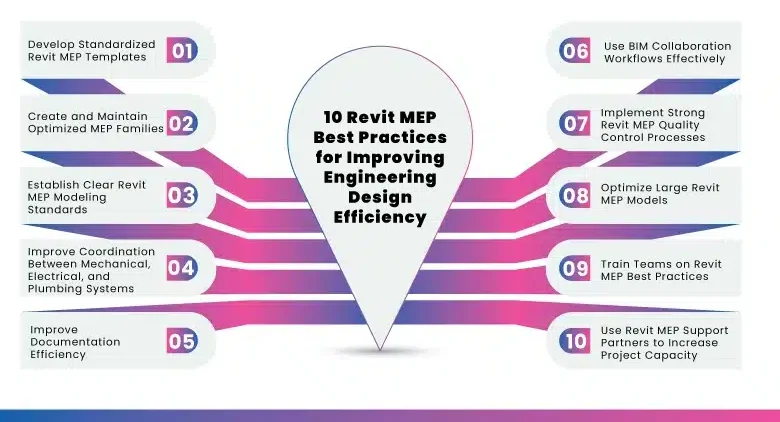
10 Revit MEP Best Practices for Improving Engineering Design Efficiency
1. Develop Standardized Revit MEP Templates
One of the most effective ways for MEP firms to improve efficiency is by creating standardized Revit templates.
A well-developed template reduces project setup time and ensures consistency across different projects and teams.
A professional Revit MEP template should include:
- Standard project settings
- View templates
- Sheet layouts
- Annotation standards
- MEP system settings
- Company-specific families
- Shared parameters
- Documentation standards
With a standardized workflow, engineers spend less time configuring projects and more time focusing on design development.
For firms handling multiple projects simultaneously, templates provide consistency and improve overall project delivery speed.
2. Create and Maintain Optimized MEP Families
Revit families are the foundation of any MEP model. Poorly created families can negatively impact model performance and create coordination problems.
MEP firms should maintain a reliable family library with:
- Accurate component information
- Proper naming conventions
- Correct parameters
- Appropriate levels of detail
- Optimized geometry
Examples of commonly used MEP families include:
- HVAC equipment
- Air terminals
- Electrical fixtures
- Panels
- Plumbing fixtures
- Mechanical equipment
Optimized families improve model performance and help engineers create accurate designs more efficiently.
3. Establish Clear Revit MEP Modeling Standards
A consistent modeling approach is critical, especially when multiple engineers or teams collaborate on the same project.
A Revit MEP modeling standard should define:
- Model organization
- Naming conventions
- Discipline responsibilities
- File management procedures
- Level of Development (LOD) requirements
- Coordination procedures
Clear standards reduce confusion and ensure that every team member follows the same process.
This becomes especially important when MEP firms work with external engineering support teams or BIM partners.
4. Improve Coordination Between Mechanical, Electrical, and Plumbing Systems
Coordination is one of the biggest advantages of using Revit MEP.
Traditional design workflows often identify conflicts after drawings are completed, leading to redesign and schedule delays.
With Revit-based workflows, MEP teams can:
- Coordinate equipment placement
- Review system routing
- Identify conflicts earlier
- Improve communication between disciplines
- Reduce field changes
Effective coordination practices include:
- Regular model reviews
- Clash detection meetings
- Defined coordination responsibilities
- Consistent model exchange procedures
Better coordination helps MEP firms deliver more accurate designs while reducing downstream issues.
5. Improve Documentation Efficiency
Producing accurate construction documentation requires significant time and attention.
Revit MEP allows firms to improve documentation efficiency through:
- Automated schedules
- Consistent annotations
- Standardized views
- Parametric modeling
- Improved sheet management
By creating efficient documentation workflows, engineers can reduce repetitive drafting tasks and focus more on engineering decisions.
6. Use BIM Collaboration Workflows Effectively
Modern building projects involve multiple stakeholders, including architects, structural engineers, contractors, and specialty consultants.
For MEP firms, effective BIM collaboration requires:
- Proper model sharing procedures
- Clear communication workflows
- Defined file exchange standards
- Regular coordination reviews
A structured BIM workflow helps avoid misunderstandings and ensures that all project participants are working with coordinated information.
7. Implement Strong Revit MEP Quality Control Processes
Quality control is essential for delivering reliable engineering packages.
Before project submission, MEP firms should review:
- Model warnings
- Incorrect system connections
- Missing information
- Duplicate elements
- Coordination conflicts
- Documentation errors
A strong QA/QC process improves accuracy and helps maintain professional standards across projects.
8. Optimize Large Revit MEP Models
As projects become larger and more detailed, Revit performance can become a challenge.
MEP firms can improve model performance by:
- Removing unused elements
- Managing linked files properly
- Limiting unnecessary details
- Cleaning imported CAD files
- Monitoring model warnings
- Maintaining organized project files
An optimized model improves engineer productivity and reduces delays caused by slow software performance.
9. Train Teams on Revit MEP Best Practices
A company’s efficiency depends on how effectively its team uses technology.
Regular training helps engineers understand:
- Company standards
- Modeling procedures
- Documentation workflows
- BIM coordination methods
- Quality control requirements
Consistent training ensures that all team members follow efficient processes and maintain project quality.
10. Use Revit MEP Support Partners to Increase Project Capacity
Many U.S. MEP consulting firms face challenges such as:
- Increasing project workload
- Limited internal resources
- Tight delivery schedules
- Difficulty finding skilled BIM professionals
Working with an experienced Revit MEP support partner can help firms increase capacity while maintaining quality.
External support teams can assist with:
- Revit MEP modeling
- BIM documentation
- Engineering drafting
- Model coordination
- Construction documentation support
A reliable engineering partner allows MEP firms to take on additional projects without immediately increasing internal staffing requirements.
How MVN Engineering Supports U.S. MEP Firms
MVN Engineering provides Revit MEP and engineering support services for U.S. MEP consulting firms looking to improve project efficiency and expand their delivery capacity.
Our support helps firms:
- Manage additional project workload
- Improve BIM production efficiency
- Maintain consistent documentation standards
- Support internal engineering teams
- Deliver projects within deadlines
By working as an extension of your team, MVN Engineering helps MEP firms handle project demands while maintaining quality and reliability.
Conclusion
Revit MEP can significantly improve engineering design efficiency when supported by the right workflows, standards, and collaboration processes.
For MEP consulting firms, the key to success is not only adopting BIM technology but also creating structured processes that improve productivity, coordination, and quality.
By implementing Revit MEP best practices and partnering with experienced engineering support teams when needed, firms can scale their operations, improve project delivery, and remain competitive in today’s demanding building design environment.